I stand 6'3" (1.91 meters) and wear size 15 shoes.
At the movies today, as I stood to move into the aisle and down the stairs, it hit me again that the world does not quite fit me, or maybe I don't fit into it.
I unfolded myself, stepped carefully around the seats and railing, arranged my feet on the stair, and then deliberately started down. The little people all around me had no trouble navigating the cramped space.
Left to myself, I stay up late and get up late. But I live in a world where I must go to bed by a specific time so I can get up to go to work by a specific time, leave by a specific time, or otherwise adapt myself to other people's or group's schedules.
What would my own personal world look like, if I were the Dungeon Master?
There would be room. I could move freely without bumping into things. There would be space in my calendar to move freely without crashing into someone else's constraints.
Note: I am aware, of course, that physical reality demands honoring appointments and deadlines, paying our taxes by April 15, etc. I accept that. I just didn't feel like accepting it today.
Encounters With an Enlightened Man by Linda Quiring. Of the three books written by Quiring about Sydney Banks, this is probably the best. It misses the freshness of the first two books, which were written in the early 1970s when Banks started sharing his enlightenment experience, but it tells a beginning-middle-end story and paints a more complete picture of the place and time. Of interest mainly to people interested in the history of the Three Principles and Banks’ personal history. I am drafting a bigger post that takes a look at all three books.
Silver Screen Fiend: Learning About Life from an Addiction to Film by Patton Oswalt, read by Patton Oswalt. A memoir by Oswalt of the movies he compulsively watched during his first years in Los Angeles. It’s a story of being in the grip of a mild obsession well-known to those of us with a geeky/nerdy bent. His girlfriend at the time asks him to walk her out to her car from the theatre, and his first, absolutely natural, response is, “But I’ve never seen the start of the next movie and I don’t want to miss it.” Exit one relationship.
Parallel with his obsession is the evolution of his standup, writing, and acting career and how he tries to juggle that with the nightly movies shown at the New Beverly. The most chilling and haunting story to me is of a long-ago standup comrade who imposes on Oswalt for a shot at becoming a star; Oswalt has already become a character of fiction in someone else’s movie. He introduces and returns to the idea of special, sometimes dark, moments that propel one forward in life or work. He wrote this before the death of his first wife, so listening to those passages struck me as especially poignant.
The Correspondence by JD Daniels. A collection of laconic essays and two short stories that originally appeared in The Paris Review. Here’s a passage from a short story:
She’d gone to school for years to study library science. He didn’t see how it could be so complicated. It seemed like a hoax.
All the essays and both stories have that terse, dry flavor; the humor is almost an aftertaste. A rather short book, too – I read one essay or story a night in about 30 mins or so.
Jacob T. Marley by R. William Bennett, read by Simon Vance. Bennett finds a loophole in Dickens’ story to spin a tale with 19th-century flavors, coincidences, and voices. It’s a clever reworking of the original material that exploits unexplored nooks and crannies, though he does get a bit bogged down as the spirits explain the metaphysical mechanics of the afterlife and what is required for Scrooge’s reclamation. Though, if I heard the story right, it’s Marley’s sacrifice that redeems Scrooge rather than Scrooge’s own change of heart. If so, that makes Dickens’ story subservient to Bennett’s, which does not sit well with me.
Breakfast at Tiffany’s by Truman Capote, read by Michael C. Hall. I had never seen the movie nor read the book so this was new to me. It is very much a book of the 1950s – rather gray and naturalistic, the secondary characters all stagey and one-note – except when Holly explodes into the narrative with unnatural color and life. Holly is clearly the most interesting character and the mysteries surrounding her are the ones I cared about the most. Hall’s reading was fine though I didn’t care for his expression of Holly’s voice. For further reading: an excellent Open Letters Monthly essay compares and contrasts Sally Bowles and Holly Golightly.
Just Keep Going by Jeanette Stokes. Disclaimer: Jeannette is an acquaintance we run into at random cultural events here in Durham. The book is part of her ongoing memoir series; this one focuses on how her relationship to writing, art, and creativity marked key passages of her life. A compact memoir with a good collection of basic advice and resources for the new writer and timely reminders for the experienced one.
Tales of the Batman: Alan Brennert (Comixology). Archie Goodwin had a long career in the comics industry and was a much beloved writer, editor, and mentor. His Batman stories in this volume span the years 1973-2000. They tend to the pulpy and the “well-made.” He also seemed interested in expanding the canvas on which Batman stories could be told; many of the stories delve into character histories and motivations – with lots of exposition – making Batman almost a secondary character.
They’re good meat-and-potatoes Batman stories that color in unnoticed areas of Batman’s universe (who did design the Batarang and Batmobile?). The highlights for me are the six or so Manhunter stories that ran as backup to the main Batman series and that I still remembered from when I was a kid; so glad they’ve been collected at last. Goodwin’s updating of the 1940’s Manhunter character to the cynical modern-day prefigures work that Alan Moore would take to another level a decade or so later. It’s Walt Simonson’s artwork that made these stories instant minor classics.
Alan Brennert has been a successful writer in many media: stories, novels, TV, even the book for a Broadway musical. He only wrote nine stories for DC, his first in 1981 and his last in 2000. Yet they include some of the most interesting takes on the Batman mythos, mixing the pleasure of nostalgia with the character development he used in his scripts and novels. For me, his stories pay the best dividends every time I re-read them. I remember buying these comics back in the day and noticed even then how different his stories were, how he pulled out details or emotional colors that I did not see elsewhere.
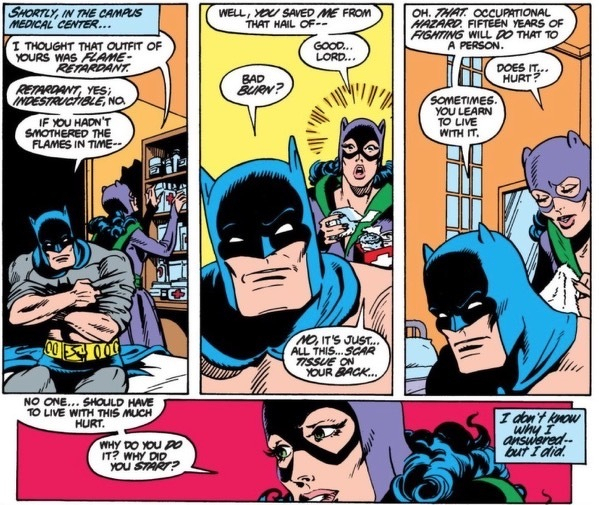
Brennert had a particular fondness (as do I) for the “golden age” or “Earth-2” Batman and my favorite story of his – maybe one of my favorites of all time – is the Earth-2 Batman teaming with Catwoman to hunt down the nefarious Scarecrow (“The Autobiography of Bruce Wayne”). Joe Staton and George Freeman drew the chunky Batman from the ’50s, a style that instantly evokes the light-hearted adventures of that era. But Brennert adds a moment that stops that feeling dead in its tracks.
Batman removes his shirt so Catwoman can attend to his wounds. She gasps at the scar tissue covering his back; it’s key that we see only her horrified reaction and Batman’s stoic response. That scar-tissue detail is so unexpected in the context of a “retro” Batman story, yet such a common-sense detail considering his life of fighting, that I am still amazed Brennert was the first to conceive of and use it. It’s a telling detail that’s now accepted as a given and enshrined in the movies.
Brennert had that freedom of approach – perhaps from his work in other media – to give his characters time to breathe amid the action and feel the weight of emotional moments. That’s not something you see in comics very much, and it’s always appreciated when it happens.
“It’s within mystery—real or invented—that the human spirit thrives. (“I don’t believe in God,” I told one of my students many years ago. “But I do believe in mystery.”)”
If you’re so smart, why aren’t you rich? Turns out it’s just chance. Daniel Lemire disputes this (see his #4 link), saying that he prefers "to assume that I am responsible for the outcomes, both positives and negatives." I disagree. I can control the actions I take or don't take, but I cannot control the results. I would say that my actions can affect the probability of an outcome I judge to be favorable to me but nothing this side of the grave is guaranteed.
Inspired by Austin Kleon's book Show Your Work, and my wholesome need to generate a new blog post everyday, here's what I'm pondering.
In Five Pots, I said I was thinking of becoming a time management coach. What would a 3 Principles-based time management coach look like? Rather like any other 3 Principles coach, I guess, except the pain point for the customer is their feeling of overwhelm.
I wondered about writing a giveaway PDF -- the two things you need to know about time management. The two things idea is something I ran across in Oliver Burkeman's column.
In listening to Mary's Daily Principles audios, she mentioned a fear she had at one time of being 54 and thinking her job at that time was the best she could hope for, or something like that. That rang a bell with me. I've felt the same thing.
I thought, waitaminnit -- maybe the thing to do is not time management. That's been an intellectual hobby for decades, but is not so urgent to me now.
But ... what do I want to do in the next stage/chapter of my life? That's an interesting, urgent, painful thought right now. And since we teach what we want to learn, then my experiment would be how to gracefully enter that stage myself (a "stage" being only a thought, of course, though we talk about it as though it were real) while coaching others who are making the same transition. In the end, it's still 3Ps coaching, but the entry point is different.
I started this post a week or more ago. I've made one "pot" (mock-up of a business card) since then. I made a list of four or five things that felt like good ideas. I notice only now that I'm still thinking about pots instead of making them. I waiting for inspiration, but I know I can create while feeling uninspired. Not berating myself, just waking up a bit.
Make four really bad pots, really quick, to meet my quota. Trust that the next five will be better.
Leech and Amphetamine are specialized Mac utilities that, when I need them, perform so dependably I thank the software gods for them.
Amphetamine (Free) keeps my Mac awake when I don't want the system to sleep. It has a terrific array of options and preference settings; it can keep the disk alive while letting the display sleep, it will run only when a specific app is running, and it can even run in response to specific system events.
For the last month or so, I've been uploading files to BackBlaze via our trembling DSL line. Before I close up shop for the night, I'll set Amphetamine to run for 12 Hours so the uploads occur while I'm sleeping.
Another time I use Amphetamine is when downloading large files, such as system software updates. I don't want the iMac to go to sleep during a big download only to wake back up the next time I log in and resume the download. Amphetamine prevents that annoyance from happening.
And speaking of downloading...I trust Chrome to download most of the middling files I run across or have to download, like PDFs and whatnot.
But when the use cases run to downloading large files or a large number of files, then I want to use a memory-efficient and dependable standalone program.
Enter Leech ($6) from Many Tricks Software. Leech offers a simple interface: simply drag the download link to the Leech window and the download starts. Drag several links to the window to queue them.
I used Leech recently to download a batch of .CBZ and .EPUB files related to a Humble Bundle comics package I bought. I simply dragged each CBZ download link to Leech, made sure Amphetamine was running, and went to bed. Doing that job in Chrome would have taken hours, maybe many evenings, and resulted in me crying and despairing of my poor life choices.
Like Amphetamine, Leech offers lots of customizations and settings while remaining small, easy-to-use, and utterly reliable.
And be sure to check out Many Tricks Software's other applications, of which I own my fair share.
What I have found in the last few years of reading and soaking in The Three Principles -- and it's been a gradual process of understanding -- is that I generally feel and perform better when I do not have a lot on my mind.
What do I mean by "not a lot on my mind"?
I mean not talking to myself when I'm walking to my car.
I mean not carrying on a conversation from decades ago with the person that annoyed me.
I mean not fretting about what I will do this afternoon or tomorrow or next week when I'm standing in line at the grocery store.
I mean not focusing my mind on solving or figuring out problems that exist only because my mind made them up.
I mean leaving an empty space where worry and anxiety would drive me to distraction.
I mean seeing and understanding that those thoughts are not real, are not really happening to me now, in this moment. They only have power if I choose to pay attention to them.
There is a big meeting at work tomorrow. Four or five years ago, I would have been nervous and anxious about attending and speaking at it.
I still have a bit of thinking about it. That's normal and human. But I know my thinking isn't real and is telling me only about what I'm feeling in the moment. My thinking cannot predict the future. My well-being does not depend on its outcome, whatever its outcome.
I can hear my inner gremlin wanting to engage in debate with me. You haven't prepared enough! You're not knowledgeable or skilled enough! What will they say about you when the call is over?
Those are thoughts that I find easier now to let drift down the river. I do not need them on my mind. New thought will come along if I wait and if I'm not burdened with that old stale thinking.
Part of trusting my intuition and my creative spirit is accepting that I do not control my thoughts, when ideas come to me, or even sometimes why I do what I do when I do it. Part of trusting my subconscious includes trusting that the actions I take may not make much sense in the moment, but that they will in the fulness of time. Like seeing only dots on a canvas, only to step back and see them resolve into a beautiful painting.
After so many years as a worry wart and a Nervous Nellie, it's odd to not feel the weight of those heavy thoughts in my cup. An empty cup is so much less distracting, so much lighter.
It interests me that most plateaus tend to last two days before dipping back down. I usually do a 20+ hour fast on those days, so I imagine most of the weight loss is water. Still -- it's a pattern and we humans like patterns.
By rights, I should have been at 206 or thereabouts by the end of the period. But my rise in weight from the 20th onward is positively evil. My enemies no doubt learned of my experiment and enlisted an all-too-eager world to derail me.
What can I say? They succeeded. But let's be grateful: I stayed below 210 so I did achieve and sustain a 2lb. loss. Take our successes where we can.
A new idea that came my way: I don't have an eating problem so much as a thinking problem. That is something to ponder as I make my new chart and carry on measuring.
Two incidents yesterday consumed lots of investigation and research time. Then, with the right trick, dissolved into nothing. It's finding that "right trick" that's tricky.
Importing Audible Downloads to iTunes
Scott wanted to burn his Audible purchases to CD so he could listen to the books both in his car and on the CD player in his office. He's on Windows 7.
Trying to download purchases from his Audible library page only took us to a generic "how to listen to your audiobooks" page. I poked around the support pages and downloaded the Audible Download Manager (ADM) application--nothing. I authorized his computer to download Audible files--nothing. I installed iTunes because it was clear from the support docs that burning Audible books to CD is really only supported via iTunes. I specified to ADM that we were using iTunes. But again, nothing.
At this point, I contacted tech support via chat and it was escalated up to someone with more divine knowledge.
She pointed me to an obscure setting on the Accounts page.
Go to Audible.com in your web browser and log in to your account.
Hover your mouse over where it says, "Hi, Firstname!" at the top of the page and select Account Details.
Log in again.
Click Update Settings in the left column.
At the bottom of the settings page is a section titled Software Verification with a single checkbox. That setting controls whether Audible will check to see if the Audible Download Manager (ADM) is on the user's computer. Clear that checkbox (that is, turn it OFF -- we did not want Audible to check if ADM was installed).
After clearing that setting, clicking the Download button downloaded a file called "admhelper." I double-clicked the admhelper file and the download instantly started in ADM. It even loaded the file into iTunes' Audiobooks section. (If everything were working as expected, ADM would intercept and run that file.)
I would never have found that setting nor would I have known what to do with it had I found it.
Troubleshooting time: about 90 minutes.
The Case of the Rogue MP3 Tags
I had a 2GB collection of 299 short spoken-word audio files. I'd run them through Audio Book Builder to create a multi-part audio book I could listen to using iBooks on my iPhone.
The files were reasonably named in CamelCase format, like "AMomentIWillNeverForget.mp3," and sorted alphabetically in the Finder.
But when I looked at the audiobook "chapters" (that is, the individual MP3 files) in the iBooks interface, there were no filename titles. Only names like "Recording 413" or "Recording 56." It wasn't a sad sad sad thing, but I would have preferred seeing the filenames instead.
Looking at a sample file with Get Info, I could see that the Title metadata was "Recording 56."
OK, so the person's recording software automatically assigned a title to the recording. The original recording may even have been automatically titled "Recording 56." So he renamed the file in the Finder or Windows Explorer rather than using audio-editing software. So while the file had his intended name, the file's metadata carried the original "Recording 56."
Which in the real world may not be an issue, but when you want to play that file in iTunes or on any MP3 device, the software will look at the Title tag and ignore the filename. I tried using Doug Adams' Join Together application and got the same result: it read the Title tag, not the filename.
What to do, what to do. I started searching for "mac application mp3 tag editor" and even added "automator." I did not want to individually edit 299 files; it needed to be a batch operation. And I could tell that even Doug's Applescripts could not help me here; they depended on well-tagged files and would not, I think, scoop up the filename for use as a variable.
I skimmed the various offerings using my "zero grief policy" criteria and passed by those that looked old, too fiddly, or required compiling a command-line app (though a command-line app in a script might have been able to do the job).
I considered Metadatics and looked at the other projects the guy offers. Where there's one audio program available, there are usually 3 or 4.
And lo, I found it: a freeware app called Tag Stripper. Its purpose in life was simple: to remove all of a file's metadata.
Tag Stripper will eliminate any non-audio data from an audio file. Some examples of tags that are removed are: ID3v1, ID3v2, Logic Metadata, Garage Band Metadata, and Pro Tools Metadata.
Better: all you needed to do was drop one or many files on the application and it would either output the stripped files to a new directory or overwrite the old files.
So maybe I didn't need to be a cleverboots and find a way to switch a tag with a filename. Maybe clearing the tags was all I needed to do.
I tested Tag Stripper on copies of five files, choosing to overwrite the old ones. The Finder showed that the Title metadata was gone. I dragged the new files into Audio Book Builder and lo! The filenames now appeared.
Success! Heady with excitement, I dragged all 299 files onto the Tag Stripper application and watched in awe and delight as it chewed through all the files, one by one, leaving clean files in their place.
I regenerated the audiobook files with the stripped files and I can now scan the filenames in iBooks. My OCD is satisfied.
Time spent: maybe an hour or two, off and on.
Conclusion?
I don't know that there was a method to my troubleshooting beyond:
Know that I can solve the problem, or at least get a result close to what I want.
Try stuff.
Ask for help when I don't know what to do next.
Be open to the solution being different from what I expected or wanted.
Improvise, dance, adapt to circumstances.
Thing is, I've been futzing with computers since the mid-80s and so this is all a bit of a pastime for me. How do normal people deal with this mess?
I have been posting lots of stuff since December 25, 2017. Not as much as Seth Godin, of course, but my little share. Why?
I don't know why, precisely, except...I see that I've been posting lots of tips and tricks, advice, things I've learned from years of working with computers, writing, and myself, and a few ideas or curios that seemed worth sharing.
I cannot find a unifying thread to the posts, nor does there need to be one, of course.
But I had a thought today -- maybe I'm emptying my cup. You've certainly heard some version of the old zen proverb:
Scholar Tokusan, who was full of knowledge and opinions about the dharma, came to Ryutan and asked about Zen.
At one point Ryutan re-filled his guest's teacup but did not stop pouring when the cup was full. Tea spilled out and ran over the table. "Stop! The cup is full!" said Tokusan.
"Exactly," said Master Ryutan. "You are like this cup; you are full of ideas. You come and ask for teaching, but your cup is full; I can't put anything in. Before I can teach you, you'll have to empty your cup."
As the commentary on that page explains:
By the time we reach adulthood we are so full of stuff that we don't even notice it's there. We might consider ourselves to be open-minded, but in fact, everything we learn is filtered through many assumptions and then classified to fit into the knowledge we already possess.
This blog started out years ago as an online research notebook: a place where I could learn about Wordpress, how to maintain a web site, and take notes on my progress through UNC-CH's Master's of Information Science program.
Later I found that I felt better on days I wrote than on days I didn't. That fueled some writing but my output was irregular, and this blog became more of a mostly blank canvas, with splotches of color here and there.
But on Christmas day last year, for whatever reason, the blog became a vessel into which I started pouring stuff that wanted to come out. It's a hodgepodge and that's OK, that's what is swirling in my mind right now.
Perhaps the reason I'm posting every day is to empty my mind and see what new knowledge (if any!) will fill that space. I've held on to a lot of this stuff for a long time. Time to share it and learn some new things.