This, then, may be the one great secret that keeps the uninitiated out of the “inner circle”, and those “in the know” secure in their art: the ability to care. –John Carney
My first year in graduate school, I took a course in structural mechanics taught by Bob Eubanks, a remarkable man who combined highly theoretical research with a very down-to-earth personality. He was powerfully built, bald with a little moustache, and had a habit of making noises as he breathed that combined humming, growling, and snorting. The impression he gave was that of a bull.
During the final exam, he sat at a desk at the front of the class, reading the newspaper and occasionally looking out at us. About an hour into the test, he must have seen something in our faces or our frantic scribbling that bothered him, because he got up and walked around the room, stopping behind each of us and giving a little grunt as he looked at our test papers. This was not a confidence-builder.
When his tour was complete, he returned to the front desk. “Gentlemen,” he said, “if I might make a crude suggestion… If sex is a pain in the ass, you’re doing something wrong.”
He went back to his newspaper. We all looked at each other and then at our test papers. Most of us decided to put our pencils down and rethink whatever problem we were doing. Thirty years later, when I find myself struggling with a problem of any sort, I remember Bob Eubanks’ advice, put my metaphorical pencil down, and try to rethink the problem.
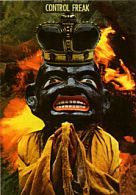
Try this meditation: Imagine that you are the wood and the fire that consumes the wood. First, focus your awareness on the part of you that is the wood. You may tremble or gasp, feeling the jolt of your solidity disintegrating, your form changing. As you shift your attention to the part of you that is the fire, you may exult in the wild joy of power and liberation. It may be tempting to favor the fire over the wood, to love the burning more than the being burned. But if you’d like to understand pronoia in its fullness, you’ve got to appreciate them equally. Can you imagine yourself being the fire and wood simultaneously? Is it possible for you to experience the deep pleasure of their collaboration? * The preceding oracle comes from my book, PRONOIA Is the Antidote for Paranoia: How the Whole World Is Conspiring to Shower You with Blessings.
How I rate songs in iTunes
#I never fiddled with iTunes before I bought my iPod 5G in 2010 as my birthday present to myself. I found -- and still find -- iTunes to be both useful and maddening. Kirk McElhearn's Take Control of iTunes ebook is a great resource for the music fan who just wants to get things done in iTunes and I recommend it. But I daresay that one of the things within the ken of even the most novice user are rating music tracks. You can rate an album or each track of an album from 1 to 5 stars. Ratings are most useful in conjunction with smart playlists, where you can specify that only 5-star rated songs can be included or exclude any 2-star songs, and so on.
Given my mania for wanting to do things "right" (yeesh) I scoured the web for advice on different ratings systems. Most of the advice follows the standard "more stars=higher quality" pattern, like star ratings for movies. Yet I thought that too simplistic and too labor-intensive. Why would I want to rate every song in my iTunes collection? Why even bother rating tracks I dislike or am indifferent about? And -- why keep them in iTunes if I don't like them, anyway?
Jason Guthrie had the best selection of non-standard advice, with two ideas that I began using right away: use one-stars for punishment and rate tracks by intensity. So here's how I rate my tracks:
- One-star tracks are songs I don't want to hear at all, ever again. One-star tracks are excluded from my smart playlists. And though I haven't done this yet, I could view all one-star tracks and simply delete them from iTunes so they never darken my earbuds again.
- Two-star tracks are slow, haunting, somewhat melancholy songs -- Barber's Adagio for Strings comes to mind. These tracks evoke a reflective mood. I tend to listen to this smart playlist in the morning, drinking my first coffee of the day, when the rest of the world is quiet.
- Three-star tracks are a little more upbeat but medium tempo; the pace of a relaxed heartbeat, perhaps. Not surprisingly, most of the tunes I rate fall into this bucket and I can listen to this at any time; it's like a personal radio station of easy listening music and includes classical, pop, world, lounge, and other genres.
- Four-star tracks are the upbeat, fast-paced tracks with a driving beat that put a silly grin on my face. "Jaan Pehechan-Ho" is the go-to example here, but so is "The Intro and the Outro." I tend to play this late in the day when my energy flags and I want a pick-me-up.
- Five-stars ... I haven't come up with a need for five star ratings yet. So I'm reserving this classification until a great idea comes my way.
I don't rate absolutely every track in iTunes, as that way lies madness. I only rate those tunes I like well enough to want to listen to again. So my 2-, 3-, and 4-star playlists hold only a fraction of all the music I've recorded or downloaded so far, yet they're the tracks that give me the most pleasure.
The ratings by intensity reminds me of a tip I read from Michael Neill, I think, where he recommended creating playlists based on your mood. So when you're in a bad mood and want to feel better, create a ladder of playlists that take you from low to high. Start by listening to the playlist with songs that resonate with your sad or angry mood. Then, move to a playlist with songs that are less dark, more bright. Then, move to a playlist of songs with happier associations. In this way, you can use your iPod to make yourself feel better just by listening to music.
And if you don't want to go to all the trouble of creating moody playlists, well, there's an app for that.
“Complexity is a chronic infection. Once you’ve got it you spend lots of time managing it. It almost never goes away.” — Jason Fried (37signals)
"Asylum of the Daleks"
#Oh dear, my carefully crafted image as a man of the book and too clever by half will now fall to the ground when I talk about "Doctor Who" fanboyishness. Ah well -- let the egg roll, as they say. I don't ride motorcycles or jump out of airplanes, I just document my little life on the web and try to pass the time agreeably with all I meet.
Please don't look at me as I type this. It's embarrassing.
Now, on to my Doctor Who viewing habits:
- I usually purchase a season pass via iTunes for the SD (rather than HD) version.
- I usually download it on Sunday morning and enjoy watching it Sunday night.
- A day or so afterward, I read what Ross Ruediger and Steven Cooper have to say about the episode, finishing with the Wikipedia entry on the episode, to get a sense of what the mainstream reviewers thought of the show and any interesting tidbits the other fellows left out. I find myself more in agreement with Steven's reviews, as he packs a lot of context and interpretation into his posts, and usually highlights the best lines that really express character or emotion.

Now, Season 7 just premiered on Saturday night all over the BBC-speaking world, the reviewers have had their say. I won't attempt to compete with them as they do a far better job than I could. Here's some of what caught my eye from the episode, in no particular order:
- The classic rule of writing is that the ending should be in the beginning. Those seeds should be planted early on. And it is, during Amy's model shoot where she punches at the camera with HATE and LOVE written on her fingers. Clever Mr. Moffat -- signaling his themes right from the start, punched right in your face. (With a tip of the hat, of course, to Charles Laughton's "Night of the Hunter," where Robert Mitchum's character has those letters tattooed on his fingers. One of those movie images that has entered into the collective unconscious.)
- Jenna-Louise Coleman as Oswin was brilliant. As she was never in the same room as the actors she was talking to, she had to generate all the energy and interest in the scene herself. And it was impossible not to fall in love with her.
- When Oswin bids the Doctor to "remember her," Jenna Louise-Coleman smiles and looks directly at the camera, breaking the fourth wall -- she's asking US to remember HER. And we will, when she reappears in the Christmas special. Despite Ross's impatience with the season 6 arc, it looks like The Moff is laying plans for another long-term payoff.
- Making the audience see and fall in love with Oswin is rather like the device used in "A Beautiful Mind." A clever trick played on an audience that believes everything it sees because that's what medium forces you to do. Another masterful Moffat misdirection.
- The moment when Amy hallucinates and sees a room of elegantly dressed men and women was so wonderfully surreal and unexpected that it took my breath away. A really bold choice; it doesn't advance the plot, really, or reveal character, but it pushes the right buttons of disorientation and keeping you watching the screen to see what happens next. It's the kind of moment you never see in a Davies script.
- It was a show on a grand scale, but it didn't feel as big or affecting as "Family of Blood" or "Amy's Choice" or "The Girl Who Waited". Hard to say why -- possibly because it was so hard to believe that Amy and Rory's marriage was over; the "Pond Life" mini-episodes that ran the five days prior to the season premiere showed them rolling with the flow of their odd life together. These two people have gone through fire for each other; this divorce gimmick felt like a gimmick and diminished whatever emotional power this subplot might have had.
- Or the smallness of the show could have also been that there's something terrifying about one maniacal Dalek on the loose or a small number of them in a confined space. But seeing a bazillion Daleks just sitting and quivering in place flattens the effect; more than one or two Daleks just isn't scary. Though hearing a bazillion screaming Daleks is spine-chilling.
- Loved the trapezoidal passageways in the asylum, as they call back to the First Doctor's inital visit to Skaro.

Moffat, Davies, and the New Who
#Ross Ruediger had a rather sour take on season 6 of Doctor Who. He had problems with Matt Smith's puppydog energy and showrunner Steven Moffat's "celebration of the clever" in dialogue and plotting the season-long story arc, which culminated in the solution to the mysteries of how the Doctor "died" and his connection to River Song.

It's a matter of taste. I believe Moffat when he says that kids have no trouble following the plot complications and it's the fans and critics who complain the most. I certainly enjoyed the cleverness of how (most) everything in seasons 5 and 6 clicked together; I like trying to outguess a master storyteller like The Moff. And I don't think the arc worked against the show's episodic nature, although I could argue that this is a Doctor Who for the modern age of TV, and season arcs, DVD collections, and being a flagship moneymaker for the BBC necessitate all sorts of choices that couldn't have been imagined during the Classic Series' run.
I like Moffat's and Matt Smith's conception of the Doctor as a man who doesn't ruminate and smolder over the past; there's a colder, more cerebral, more dangerous edge to this Doctor than I've seen in the previous two incarnations. The choice he forces on Rory in "The Girl Who Waited" is a prime example of this
I agree with Ross that Smith is probably a better dramatic actor for this part than Tennant, but the modern Doctor is now an amalgam of producer and actor, more so than it ever was in the classic series. And, Moffat is giving Smith stuff to play with that Tennant never had. Moffat is clever and a little shifty, therefore so is the Doctor (and Sherlock!). And Smith adds his own dollop of secret sauce to the recipe; I always have the feeling that, in most every scene, Smith's Doctor is holding back some information he's telling no one else, and this knowledge informs the actor's choices of glance and gesture. I daresay this is information that is never vouchsafed to the viewer.
Given that the Doctor is a time traveler, it's inevitable that he will know more than the people around him, and so he has to guard against spoilers; therefore, he can't really tell his companions all he knows. But also, as he hinted at in "Amy's Choice", he has a lot of darkness to contend with in his personal history. Being openly emotional might unravel his rather tightly wound demeanor. Without the distractions of monsters and dashing here and there and fixing the TARDIS, he would have to contend with his past. Maybe even forgive himself. Better, perhaps, to live in an eternal now -- of Daleks, Amy and Rory's marriage, life-threatening dangers, seductive puzzles -- and not raise ghosts.
Ross pointed out a qualitative difference between Moffat's cleverness and Davies' naked emotion. For me, the emotion in Moffat's work is more powerful dramatically because the characters are so restrained so much of the time. The Doctor's tears at the end of "The Doctor's Wife" and the utter joy at Amy and Rory's wedding party are proof of that for me.
But I will allow that nothing in Seasons 5 and 6 have come close to the feelings of sadness and loss as did "Dalek" or "Family of Blood" or "Midnight" or "Turn Left." Those moments were, I think, given some extra polish and handcrafting by Davies because those were the kinds of moments that moved him; Moffat would have emphasized different moments, different beats, different colors. That's simply how writers are. Doctor Who is neither Davies nor Moffat; it's both of them, and everything that came before them. And the mythos is greater because it can contain them all, from the mugging of Tom Baker to the gravity of Christopher Eccleston.
What I like particularly about Moffat's stories, beyond the whipsmart dialogue and whiplashing plot twists (and even if it were only those things, I'd still love them), is something I never perceived in Davies' work: the surreality of Moffat's imagery. The child in the gas mask, the astronaut in the lake, the Weeping Angels, the mad version of London at the start of "The Wedding of River Song": these are arresting images and TV thrives on arresting images. They're attention-getting and get people talking. And they don't lose their potency on successive viewings. The Season 7 opener contained one surreal sequence in particular that knocked me backwards; it was the kind of experience I'd never have had in a Davies story.
I had intended this to be a review of the first episode of the new Season 7, with a brief digression about Ross's review. But as usual, my words got away from me. Tomorrow: my stray thoughts on "Asylum of the Daleks."

Assorted links
#- One of my favorite writing sites is by England-based sitcom writer James Cary and called, appropriately, "Sitcom Geek". What I love about his posts are his practical and serious thoughts on the business of conceiving and writing situation- and character-based comedy (as opposed to sketch or standup comedy). Here's his latest post, echoing the feelings/advice I read on many academics' and fiction-writers' sites: Just start typing
- Another favorite blog is by self-help writer and editor Doug Toft. Here's one of his latest: 7 things to know before you use a self-help technique
- I also enjoy the rough and ready booster shot that is the language learning site, All Japanese All The Time. Khatzumoto continues to stun me with his inventiveness and cheek in generating advice on how to teach yourself any language (especially Japanese). A great read for auto-didacts and those who want to be. Here's a recent post that helped me make up my mind on a personal issue that had stymied me: The problem is choice
- Who killed lard?
- Zombie grammar rules that eat your brain. First on the menu: split infinitives.
- Fascinating: Sewer workers (and dwellers) of Victorian London
Dear Ones, the ego self, that part of you that wishes to keep you small and separate in order to retain control, will rail up whenever you are about to take a huge leap in growth. It will do so by activating fear and doubt. So, why not, rather than allowing that fear and doubt to control you and stop your progress, see it instead as an indicator that something wonderful and empowering is about to break through? Remember all movement is forward movement and by staying in surrender and flow you will be navigating the Shift with the greatest amount of ease and assistance that is available to you. ~Archangel Gabriel